
92 lines
3.7 KiB
Markdown
92 lines
3.7 KiB
Markdown
# Sharp7Monitor
|
|
|
|
Ever needed a simple console program to read some variables from a Siemens S7 PLC?
|
|
|
|
|
|
|
|
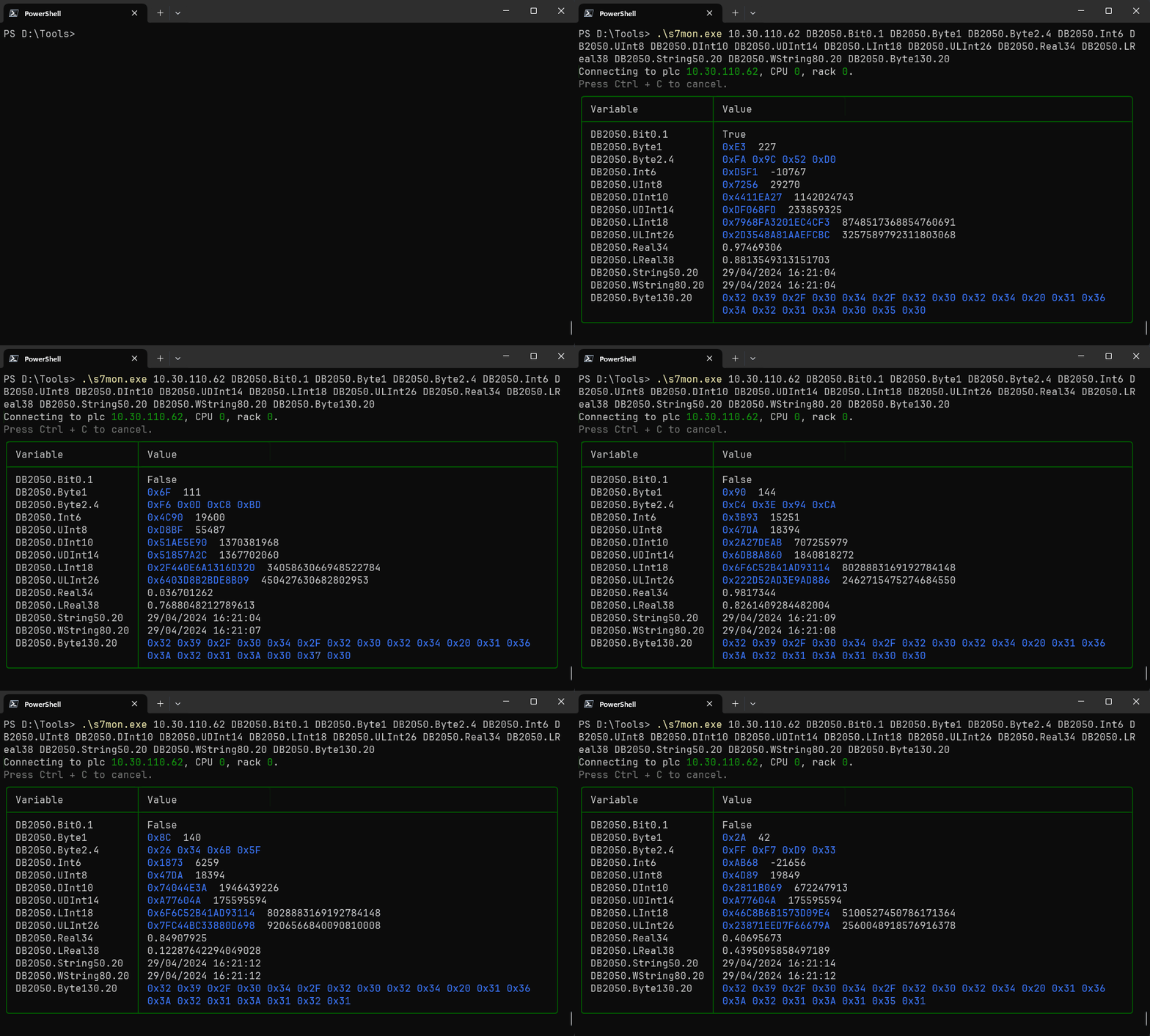
Sharp7Monitor is a .NET Console program written in C# that connects to a Siemens S7 PLC (Programmable Logic Controller) and reads specified variables.
|
|
It displays the variable values in a table format directly in your console. The content of these variables is automatically updated.
|
|
|
|
## Usage
|
|
|
|
- Download the zip file for your plattform from [releases](https://github.com/Peter-B-/Sharp7.Monitor/releases/latest):
|
|
|
|
- [Windows x64](https://github.com/Peter-B-/Sharp7.Monitor/releases/latest/download/s7mon.win-x64.zip) - If you are not sure what to download, this is most likely what you need.
|
|
- [Windows Arm 64](https://github.com/Peter-B-/Sharp7.Monitor/releases/latest/download/s7mon.win-arm64.zip)
|
|
- [Linux x64](https://github.com/Peter-B-/Sharp7.Monitor/releases/latest/download/s7mon.linux-x64.zip)
|
|
- [Linux Arm 64](https://github.com/Peter-B-/Sharp7.Monitor/releases/latest/download/s7mon.linux-arm64.zip)
|
|
|
|
- Extract the `s7mon.exe`, resp. `s7mon` binary.
|
|
|
|
The binaries are self contained - no installation of .Net Runtime is required.
|
|
|
|
|
|
|
|
- Run the following command:
|
|
```powershell
|
|
.\s7mon.exe <IP_Address> <Variable1> <Variable2> ... <VariableN>
|
|
```
|
|
Replace `<IP_Address>` with the IP address of your Siemens S7 PLC, and list the desired variables (e.g., `DB2050.Byte1`, `DB2050.Int6`, etc.).
|
|
|
|
You can find a description of the variable format on the [Sharp7.Rx readme](https://github.com/evopro-ag/Sharp7Reactive).
|
|
|
|
If the connection cannot be established, try setting [CPU and Rack](https://github.com/fbarresi/Sharp7/wiki/Connection#rack-and-slot) with the `--cpu` and `--rack` parameters.
|
|
|
|
- The program will establish a connection to the PLC and continuously display the values of the specified variables in a table format.
|
|
|
|
Press `Ctrl + C` to exit.
|
|
|
|
|
|
### Command
|
|
|
|
`s7mon.exe <IP address> [variables] [OPTIONS]`
|
|
|
|
### Arguments
|
|
|
|
<IP address> IP address of S7
|
|
[variables] Variables to read from S7, like Db200.Int4.
|
|
For format description see https://github.com/evopro-ag/Sharp7Reactive
|
|
|
|
### Options
|
|
```
|
|
DEFAULT
|
|
-h, --help Prints help information
|
|
-c, --cpu 0 CPU MPI address of S7 instance.
|
|
See https://github.com/fbarresi/Sharp7/wiki/Connection#rack-and-slot.
|
|
|
|
-r, --rack 0 Rack number of S7 instance.
|
|
See https://github.com/fbarresi/Sharp7/wiki/Connection#rack-and-slot.
|
|
```
|
|
|
|
|
|
### Example Invocation
|
|
|
|
```powershell
|
|
.\s7mon.exe 10.30.110.62 DB2050.Byte1 DB2050.Byte2.4 DB2050.Int6 DB2050.Real34 DB2050.String50.20
|
|
```
|
|
|
|
### Configure Cpu and Rack
|
|
|
|
Use `--cpu` and `--rack` parameters to specity the S7 instance to connect to. The required values depend on
|
|
the S7 you are using and it's configuration. You can find more information in the
|
|
[Sharp 7 docs](https://github.com/fbarresi/Sharp7/wiki/Connection#rack-and-slot).
|
|
|
|
|
|
|
|
## Contributing
|
|
|
|
Contributions are welcome! If you encounter any issues or have suggestions for improvements, feel free to open an issue or submit a pull request.
|
|
|
|
## License
|
|
|
|
This project is licensed under the MIT License - see the LICENSE file for details.
|
|
|
|
## On the shoulders of giants
|
|
|
|
This project is based on great libraries:
|
|
|
|
- The [Sharp 7](https://github.com/fbarresi/Sharp7) S7 PLC driver, based on [Snap 7](https://snap7.sourceforge.net/) by Davide Nardella
|
|
- [Sharp 7 Reactive](https://github.com/evopro-ag/Sharp7Reactive)
|
|
- [Spectre.Console](https://github.com/spectreconsole/spectre.console)
|
|
|